What’s new at Ottimate: Fall 2026 release
by Don Dittmar
AP work rarely breaks in one place. It cracks in small ways that add up: a W-9 that lives in someone’s inbox, an approval policy that never got copied to a new location, an invoice with no tax that nobody flagged.
Ottimate’s Fall 2026 Release targets those concerns by giving AP teams the tools they need to better onboard and connect with suppliers, work faster in their accounts, uncover use tax on invoices, and ensure all this information syncs seamlessly into their ERP, so problems are fixed before the books are closed.
Supplier relationship management
Supplier relationship management (SRM) is Ottimate’s new portal that gets suppliers and buyers on the same page. Buyers wake up on a Monday morning to an inbox full of “Where is my payment?” and someone is hunting through Google Drive for an updated W-9. On the supplier side, an AR clerk fills out the same tax and bank forms for the fifth buyer this quarter and emails a TIN as a PDF attachment. Both teams lose hours to back-and-forth that neither one wants.
Fragmented communication, manual data entry, and a lack of real-time visibility create friction in this relationship and lead to critical breakdowns that impact each:
- Fraud risk. Bank and TIN changes arrive by unencrypted email, so AP’s main defense is a manual phone callback.
- Duplicate identities. One supplier ends up with several records in the ERP, which muddies master data and risks sending a payment to the wrong account.
- Status questions. Suppliers can’t see where an invoice sits in approval, so they email AP to ask.
- Repeat paperwork. Suppliers resend W-9s, certificates of insurance, and bank details to every buyer.
What SRM does about it
Most ERPs treat a supplier as a disconnected record. SRM treats the supplier as a relationship. You invite a supplier to the portal, request the documents you still need, and the supplier responds directly in the portal with their own tax and bank details. Everything lands in one system of record that stays aligned with your ERP.
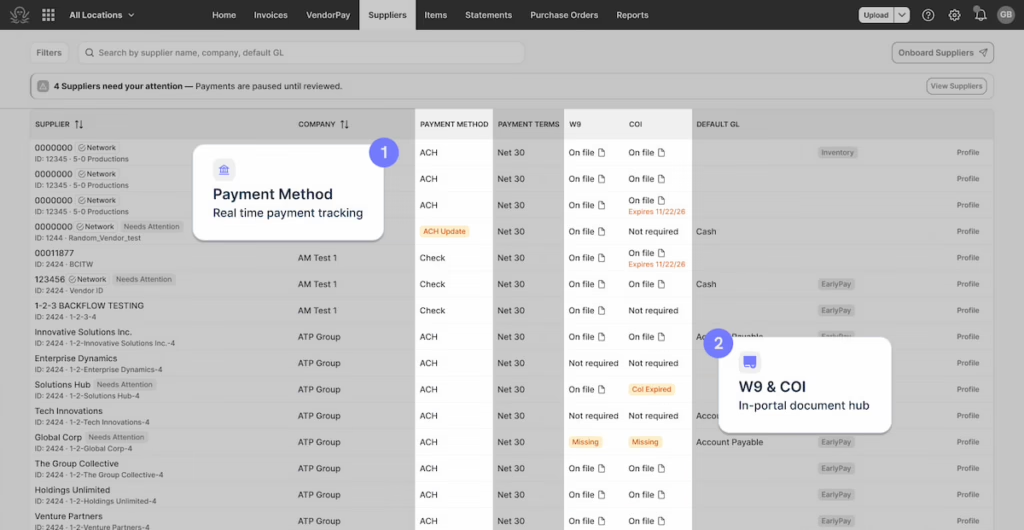
SRM is built on four capabilities:
- Verified supplier identity. Duplicate vendor records consolidate into one digital identity anchored by the supplier’s TIN, so setups aren’t repeated, and master data stays clean.
- Automated onboarding and self-service. Suppliers enter their own tax details, manage bank account information, and complete required documentation in the portal.
- Compliance and risk monitoring. SRM tracks tax forms, certificates of insurance, and bank verifications, and alerts your team before a non-compliant payment goes out.
- Invoice and payment tracking. Buyers and suppliers can see the same invoice approval and payment status in one place.
What buyers get
- A requirements and document dashboard. See which documents, such as COIs and W-9s, are pending, missing, or waiting for review across every supplier. You spot the gap before the invoice is processed, not after.
- Tax and identity verification. SRM checks the legal name and TIN, along with business address signals, to confirm the supplier is real. That protects you from backup withholding penalties and from paying invalid businesses.
- Secure bank and payment setup. Suppliers submit bank details through an explicit assignment flow with validation checks. AP no longer verifies bank letters by hand or makes callback calls for every change.
What suppliers get
- One profile, updated once. A supplier enters tax, bank, and compliance data once, and that information carries across every connected buyer. A new buyer relationship starts faster because the paperwork is already done.
- A self-service portal. Suppliers can check invoice and payment status anytime, taking routine status emails off their AR team and yours.
- Secure bank entry. Bank details go in through an authenticated portal rather than an email attachment. Payments go to the verified account, without transcription errors on the buyer side.
A new Ottimate experience
Three of the screens teams use most have been redesigned. The goal is the same across all three: show what needs action, then get it out of the way.
A dashboard that tells where to start
The new homepage puts invoices that need attention, pending approvals, and overdue work in one place, so no one has to click through every tab to see what’s waiting. Each dashboard card can be clicked to open the area of the product, helping teams move through their day fast.
Approval policies that match how teams actually route invoices
Policy rules now combine AND and OR logic, both within and between groups. Group related conditions together, then define alternate approval paths for the invoices that need them. Existing policies keep their logic, so nothing previously built breaks.
Multi-location operators get the bigger change: one policy can now apply across selected locations, groups, or companies. Teams can:
- Save an unfinished policy as a draft
- Check approver coverage by location
- Activate the policy when it’s ready
An invoice details screen built for editing
Teams can now edit headers and line items in place, right where the information lives. The screen shows saving and saved states and lets users pick a layout that stays from one invoice to the next.
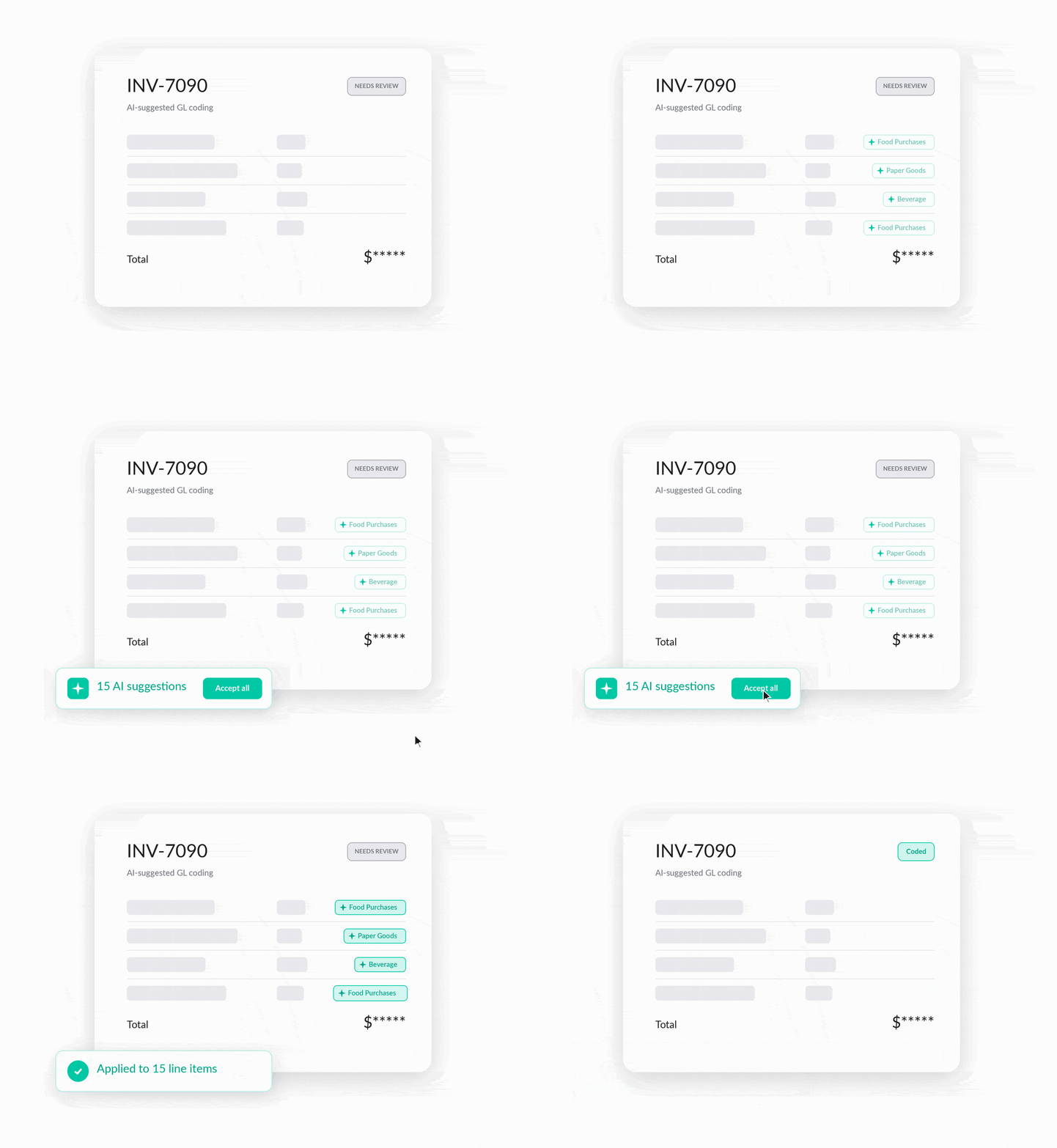
Coding gets faster too. Ottimate suggests codes based on coding history, marked with the Otti icon, so reviewing uncoded lines takes less searching. When a suggestion misses, the screen shows how often each alternative was used and how recently, making it easy to choose the right code from item-specific history or search the full list.
Use tax review dashboard
Use tax liability never arrives as a bill. It arrives as an untaxed invoice that sits unbooked until an auditor finds it.
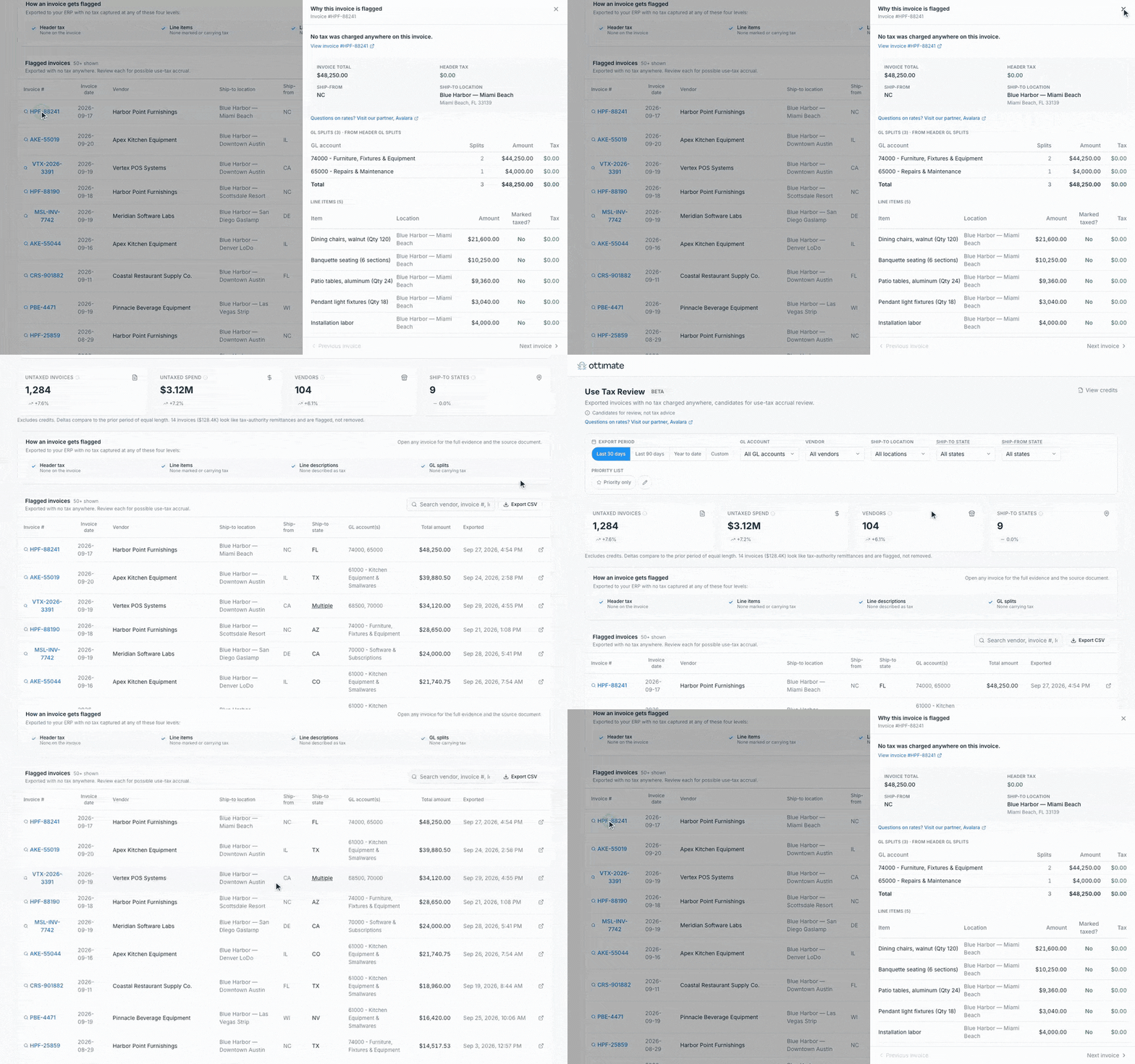
The new Use Tax Review dashboard surfaces every invoice exported to your ERP with no tax captured. It checks the header, line item, line description, and GL split, then groups your exposure so you can see where it concentrates. It gives controllers, CFOs, and tax advisors three things:
- Built-in use tax detection, so untaxed invoices surface without a manual hunt
- Accrual-ready evidence, so you can book what you owe with the support in hand
- Configurable review scope, so you decide what gets reviewed
Auditors increasingly want to see a defined process for use tax. This gives you one.
ERP integrations
Sage Intacct: Payment status now flows back from Intacct to Ottimate, so an invoice shows as paid or partially paid once the payment is recorded there. GL and dimension coding stays aligned between the two systems. The updated connection also tracks bills with multiple payments, and it sets up future work such as prepaid expenses and fixed assets for senior living teams. A planned reverse sync will keep Ottimate aligned with changes made directly in Intacct.
QuickBooks and Intuit Enterprise Suite: Multi-entity businesses on Intuit can keep their custom dimensions from invoice coding through export. Ottimate preserves the dimension level you select and carries PO tags onto the exported bill.
Jonas Synergy: This is Ottimate’s first API integration with Jonas. It automates invoice export, lets you code against your ERP vendors and GLs, and connects to Ottimate Pay so approved invoices can flow through to payment export.